Notes from Bird’s Linux Private Kitchen (3rd edition), kept for quick review.
Linux
Free software
Stallman:
“Free software” is a matter of liberty, not price. To understand the concept, you should think of “free speech”, not “free beer”. “Free software” refers to the users’ freedom to run, copy, distribute, study, change, and improve the software
Concepts
Linus Torvalds: Linux
Kernel releases split into stable even minor versions (e.g. 2.6.x) for production and home use, and development odd minors (e.g. 2.5.x) when you need bleeding-edge features.
Disks
IDE: /dev/hd[a-d][1-63]
SATA, SCSI, USB, flash: /dev/sd[a-p][1-15]
sector → cylinder → filesystem
First sector (512 bytes): MBR (446) + partition table (64)
Four primary partitions by default; extended partitions hold logical ones.
inode and block
inode (128 bytes) stores metadata and block pointers for a file; one pointer is 4 bytes.
Max file size with 1K blocks: 12 + 256 + 256256 + 256256*256 (KB) = 16GB
superblock holds overall filesystem info, including inode/block usage.
Supported filesystem types
- ls -l /lib/modules/$(uname -r)/kernel/fs
cmd
Basics
man
- h help
- /string search down (n); ?string search up (N)
- space next page; u previous page
- man -k (apropos) keyword search; man -f (whatis) short description
info
- tab move between nodes
chown
- change owner and group: chown user:group fileName
- group only: chown .group fileName (same as chgrp)
chmod
- u g o a [+(add) -(remove) =(set)] r w x # a = all
- w matters: lets a user delete, update, or create files in a directory even when they do not own every file
pwd
- pwd -P print physical path (resolve symlinks)
mkdir
- -m set mode: mkdir -m 711 test2
- -p create parent directories
cp
- -a preserve attributes
- -u copy only when source is newer
- -d copy symlink, not target
- -s create symlink to source
mv
- -b backup before overwrite; backup name gets a
~suffix-b takes no argument; mv reads VERSION_CONTROL for backup policy.
–backup chooses what to do when the target exists:- CONTROL=none or off: no backup.
- CONTROL=numbered or t: numbered backup
- CONTROL=existing or nil: if numbered backups exist, continue numbering m+1…n:
If log2.txt.1already exists, the next run creates log2.txt2, and so on. With no numbered backup yet, use simple backup below. - CONTROL=simple or never: one simple backup; a later overwrite replaces that backup too.
- -f force; overwrite without asking
- -i prompt before overwrite
- -u update only when source is newer
od
- od -t oCc /etc/issue octal and ASCII side by side
chattr
- i cannot delete, modify, or link
- a append only
- special bits
- 4-SUID on binaries: run with owner’s privileges
- 2-SGID on files or dirs: run with group of the file (handy for shared directories)
- 1-SBIT on directories: users with w may only delete their own files (/tmp: drwxrwxrwt)
fileshows details
find
find /path -mtime 0 # modified within the last 24 hours
- n means exactly n days ago
- -n within the last n days
- +n n or more days ago (>= n)
find /bin /sbin -perm +6000 -exec ls -l {} ; # files with SUID or SGID set
- -perm -mode # all bits in mode must be set
find /etc -size +50k -a -size -60k -exec ls -l {} ; # files between 50K and 60K under /etc, list with ls -l
- -a # and
- ! # negate the next test
- -o # or
ln
- ln # hard link to the same inode
- ln -s # symbolic link
Disks
dd
- dd if=/dev/zero of=/boot/test.img bs=1M count=10 # 10M test file
- dd if=/etc/passwd of=/tmp/passwd.back # backup
- default record size 512 bytes; can copy whole partitions/disks at sector level
cpio
cpio -ovcB > [file|device] # backup
cpio -ivcdu < [file|device] # restore
cpio -ivct < [file|device] # list contents
mount
- mount –bind # bind-mount a directory onto another path
- typical workflow: partition (fdisk), format (mkfs), mount (mount)
df+du
- du -sh ./* # totals per entry; subdirectory sizes roll up into parents
- du -Sh ./* # do not add child sizes into parent subtotal
dumpe2fs
- dumpe2fs /dev/sda1 -h # major filesystem info
e2label
- e2label device new_label
tune2fs
- l : like dumpe2fs -h — read superblock summary
- j : ext2 → ext3
- L : change filesystem label (like e2label)
Compression
gzip
- gzip -9 -c man.config > man.config.gz # keep original
- gzip -v man.config # compress with ratio
- gzip -d man.config.gz # decompress
- zcat man.config.gz # read compressed file
bzip2
- usually better ratio than gzip; same flags
- bzcat man.config.bz2
tar
- j: bzip2; z: gzip
- compress: tar -jcv -f filename.tar.bz2 paths…
- list: tar -jtv -f filename.tar.bz2
- extract: tar -jxv -f filename.tar.bz2 [member] -C target_dir
- -p preserve permissions
- –exclude=file # skip paths
- tar -jcv -f /root/etc.newer.tar.bz2 –newer-mtime=”2008/09/29” /etc/* # incremental backup
- tar -cvf - /etc | tar -xvf - # stream pack and unpack to current directory
vim
vim-cmd
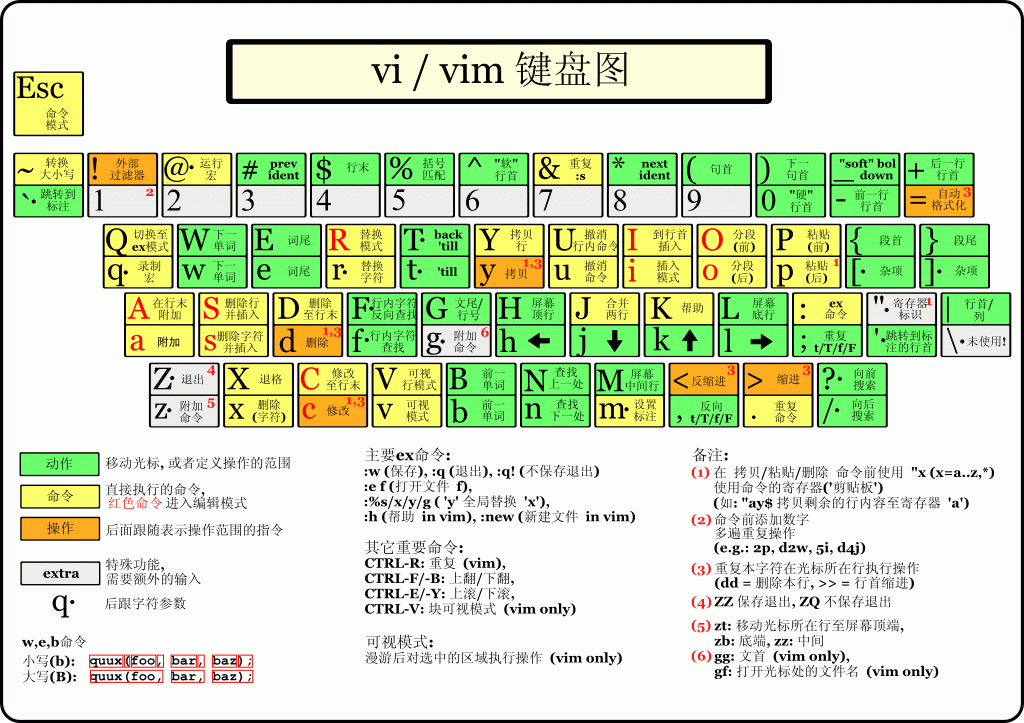
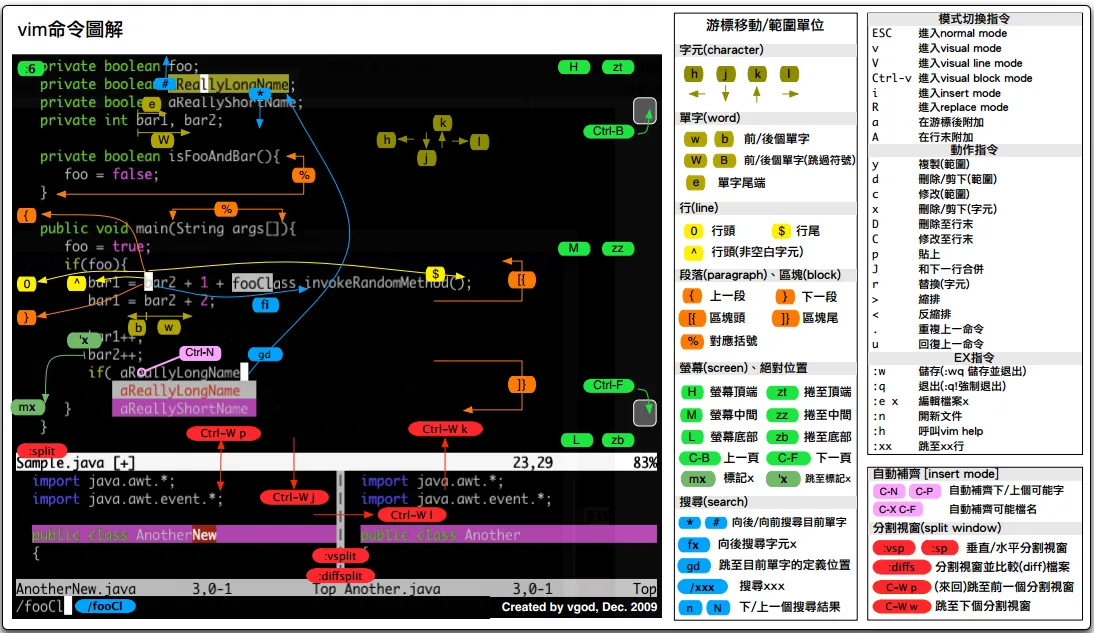
unix2dos
- k : keep original mtime (updates ctime)
- n : write to a new file: unix2dos -n old new
dos2unix
- same flags, opposite conversion
iconv
- iconv -f from_encoding -t to_encoding filename [-o newfile]
tr
- echo “A”|tr “A-Z” “a-z” # to lowercase
- tr -s ‘\n’ # squeeze repeated characters
- tr -cd [:digit:] # delete non-digits
Questions? Leave a comment below or email: newbvirgil@gmail.com